Find what is already known.
Find answers in shared documents and connected sources such as Confluence and OneDrive. Ask a follow-up in Vedin or Google Chat.
Give your operations team a companion for shared knowledge, business data, and recurring reports. Ask in plain language. No code repository required.
Find answers in shared documents and connected sources such as Confluence and OneDrive. Ask a follow-up in Vedin or Google Chat.
Explore connected product analytics and databases. Ask follow-up questions and review summaries, tables, or charts.
Schedule the summaries and checks your team needs repeatedly. Come back to the results when it is time to act.
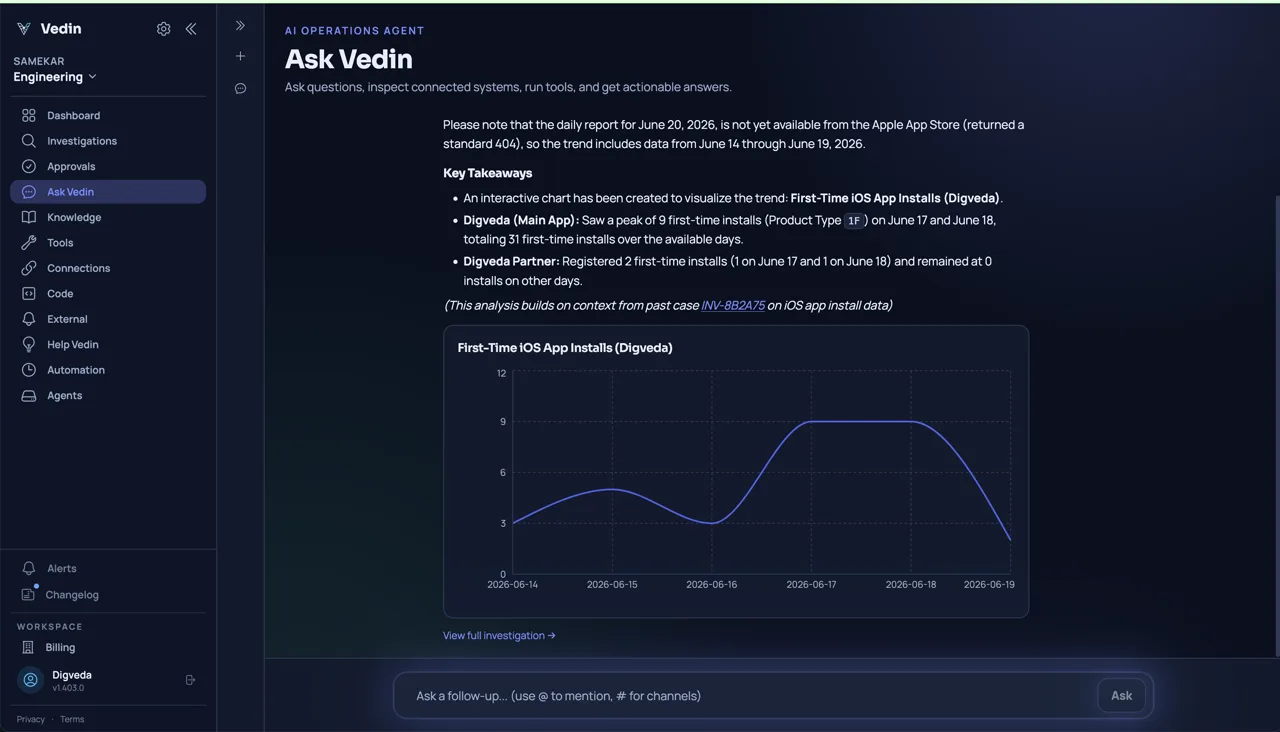
Ask about connected business data in plain language. Vedin can return a chart or summary and explain gaps in the information it used.
Vedin summarizes first-time iOS installs and displays a chart covering the available dates. It explicitly notes that a daily report was unavailable from the source.
Describe a recurring report, choose when it should run, and name where the result should go. Here, a team asks for a daily app-install report in its Operations channel.
Scheduled work uses the data, tools, and access available to your team. Check the configured schedule and review the results.
A recurring app-install report is described in plain language with a time and destination channel.
Your team chooses which sources to connect and which tools to enable. Access boundaries and approvals apply when Vedin works with that information.
Vedin does not automatically gain access to private conversations or information your team has not shared.
Explore team controlsNo. Start with documents and supported business-data connections. Code and infrastructure connections are only relevant when your work needs them.
Generated analysis can inform a decision, but it is not a guaranteed forecast. Check the source data, missing information, and assumptions behind any estimate.
No. Google Chat lets you ask Vedin questions and respond to follow-ups and approvals. Connecting it does not import your organization’s chat history.
We’ll send you a link to get started.