The knowledge to help.
The tools to act.

Vedin works with your team’s documents and connected systems to answer questions, investigate problems, and carry out tasks. Give your team more time for the work that needs them.

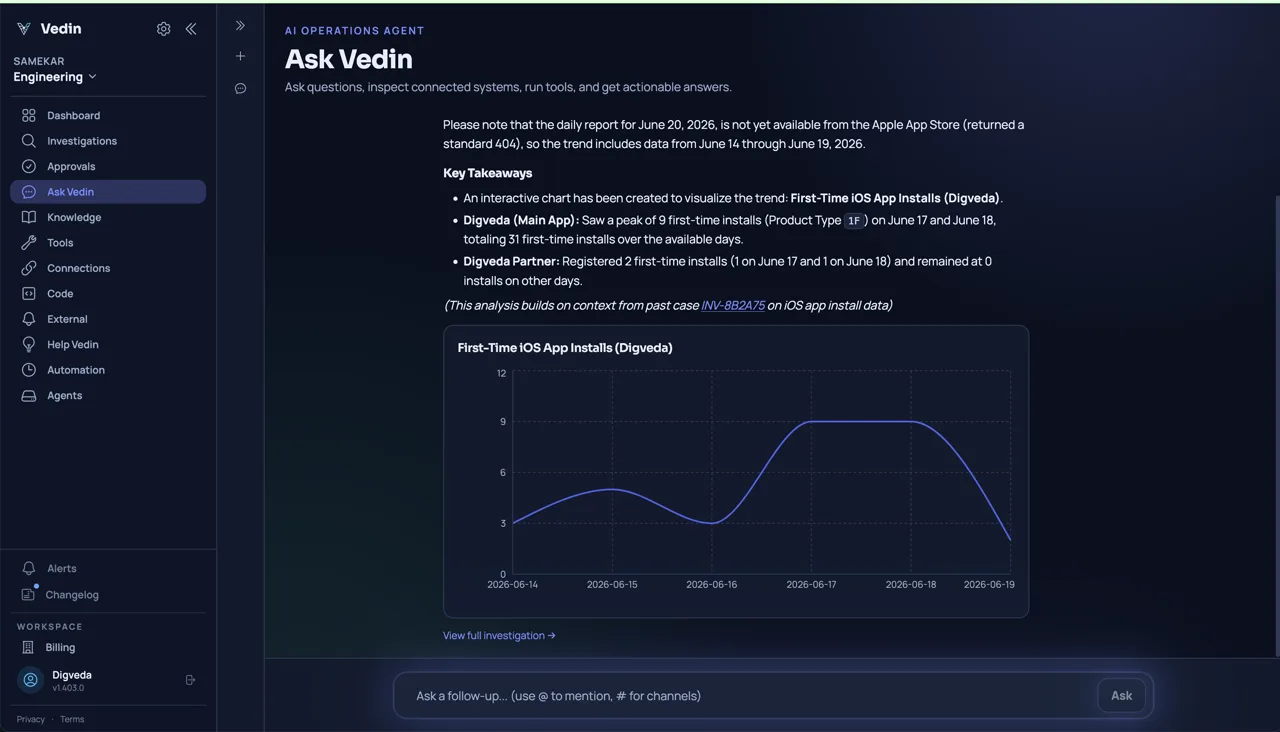
Vedin answers a question about iOS installs with a chart and notes a missing day of source data.
A question about app installs, answered with the available data. View full size ↗

What Vedin
can help with.

The same shared knowledge supports a quick answer, a code review, or a recurring report.

Keep your team’s knowledge in reach.

Bring documents, runbooks, and knowledge from connected systems into one shared base. Vedin uses that knowledge across questions, investigations, and code reviews.

  • Upload files, write documents, or sync supported sources.
  • Explore relationships between documents and generated system knowledge.
  • Review document revisions and restore an earlier version when needed.

Vedin can only work with information your team has shared or granted access to.

Explore knowledge connections
Video · Muted
What this demo shows

Vedin’s knowledge graph with a repository node selected and its generated documentation open.

Repository documentation in Vedin’s knowledge graph.

Ask the question that moves your work forward.

Find an answer in team documents or explore connected business data. Get a summary, table, or chart, then ask a follow-up without starting over.

  • Find information across your shared knowledge.
  • Compare available data and inspect the sources behind an answer.
  • Ask in Vedin or continue the conversation in Google Chat.

Check missing data and assumptions before making a decision. Generated analysis is not a guaranteed forecast.

See a business-data workflow
Video · Muted
What this demo shows

An answer about iOS installs, with a chart and a note that one day of source data is missing.

App-install analysis with a missing source report noted.

Understand the change. See what it touches.

Vedin indexes connected repositories to help you understand the code, explore service relationships, and review pull requests with more of the system in view.

  • Explore generated architecture context and cross-repository relationships.
  • Get pull-request reviews and proposed fixes.
  • Make supported knowledge available to coding agents through Vedin’s MCP interface.

Review and test proposed fixes before merging or deploying them.

Explore engineering workflows
Video · Muted
What this demo shows

Vedin’s system map shows a repository’s runtime dependency and a generated architectural-risk explanation.

A system-map detail showing a dependency and its possible impact.

Follow the evidence to the next step.

Bring Vedin an alert or a problem to investigate. It uses relevant knowledge and connected tools, records what it finds, and can propose or carry out supported actions.

  • Start from a question, supported alert webhook, or failed scheduled check.
  • Inspect the findings, tool outputs, and recommended next step.
  • Respond when Vedin needs clarification or an action requires approval.

Actions depend on enabled tools, connection permissions, and your configured approval policy.

See investigation results
Video · Muted
What this demo shows

A checkout API alert with a concluded investigation and a recommendation to restore the database pool and load-test before redeploying.

An alert investigation with findings and a recommended next step.

Set the schedule. Keep the result.

Schedule the work your team needs repeatedly. Agent tasks can prepare reports or carry out other recurring work; scheduled checks test a specific condition, such as service health.

  • Describe a recurring task and choose when it should run.
  • Use scheduled checks for supported pass/fail conditions.
  • Review run status and results, or pause work when it is no longer needed.

Available data and tools determine what can run. Scheduled work uses Credits; check the schedule and results.

See recurring work in practice
Video · Muted
What this demo shows

A request to create a daily Android install report at 9 pm IST and send it to an Operations channel.

Setting up a daily app-install report.

Useful help. Clear boundaries.

Choose Vedin’s connections and enabled tools. Configure when an authorized person needs to approve an action, and inspect the record of the work.

  • Manage access to team knowledge and connected systems.
  • Review approval requests before the relevant action proceeds.
  • Inspect recorded tool calls, outputs, and approval decisions.

An in-network agent can connect supported private systems. It does not host the full Vedin service or its AI models inside your network.

Explore team controls
Video · Muted
What this demo shows

A pending approval to restart a production service, with a proposed command, success check, and rollback guidance.

A production restart waiting for approval.

Browse all features

You hand over the task.
You can still see the work.

Some questions need only a document. Bigger jobs use connected tools and may pause for your input.

  1. Start with the work.

    Ask a question, describe a task, or let a supported alert or schedule start the work.

  2. Use what your team knows.

    Vedin searches relevant knowledge and uses the connected tools available for that request.

  3. Bring in a person when needed.

    If information is missing, Vedin can ask a follow-up. Tool calls that require approval pause for a decision.

  4. Return to the result.

    Read the answer or findings and inspect recorded work. Follow up, review a proposed change, or check the next scheduled run.

Your team’s access settings and action policies apply throughout.

See team controls

Start with what’s
on your team’s plate.

Choose the work you need help with. Start with the connections that make it possible.

Engineering

Investigate incidents, understand dependencies, and review changes. Keep your team’s attention on the product you’re building.

“What could this change affect?”
Explore Engineering

Business Operations

Find shared knowledge, compare results, and schedule reports. Start with documents and business data, without connecting a code repository.

“What changed in our installs this week?”
Explore Business Operations

Try these questions with your team’s connected sources.

Documents, chat, business data, code, and cloud. Connect the tools your team already uses.

Explore integrations

Product screenshot

Choose original size to read the details. Scroll the image to explore it.